Aadhaar App Introduces a New Digital Feature:
Update Your Aadhaar-Linked Mobile Number Using Face Authentication – Full Guide, Benefits & Step-by-Step Process

The Unique Identification Authority of India (UIDAI) has recently introduced a highly anticipated and transformative feature within the official Aadhaar App. With this new option, users can now update their Aadhaar-registered mobile number through a combination of **Face Authentication** and **OTP verification**, without the need to visit any Aadhaar Seva Kendra or enrollment center.

This upgrade comes as a relief to millions who have lost access to their old phone numbers or changed their mobile numbers but were unable to update them due to the mandatory physical verification requirement. The new feature replaces long queues, appointments, and manual verification with a seamless, digital, and user-friendly workflow—completed entirely through a smartphone.
By allowing users to authenticate their identity with a live face scan, UIDAI has taken a significant leap towards remote identity management and strengthened the foundation of India’s digital infrastructure.

Key Highlights of the New Feature:
- Update Aadhaar-linked mobile number from home—no physical visit required
- Face Authentication ensures secure and accurate identity verification
- No need for the previously registered mobile number
- Process works 24/7 using just a smartphone and internet connection
- Nominal update fee payable online via UPI, debit card, or other digital modes
- Strong security protocols by UIDAI to protect identity data
Who Should Use This Feature?
- People whose old mobile numbers are no longer operational
- Individuals who recently changed their phone number and want to update Aadhaar records
- Users facing issues receiving OTPs on outdated numbers
- Anyone who prefers online services over visiting an Aadhaar center
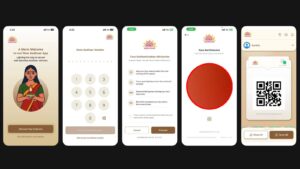
Step-by-Step Guide to Update Your Mobile Number:
- Download the Aadhaar App from the Google Play Store or Apple App Store.
- Login or complete your Aadhaar profile registration within the app.
- On the dashboard, navigate to “Update Aadhaar Online.”
- Select the option “Mobile Number Update.”
- Initiate Face Authentication when the camera opens.
- Position your face properly within the frame and complete the scan.
- Enter the new mobile number and verify it using the OTP received.
- Proceed to pay the nominal service fee through any online payment method.
- You will receive an acknowledgment, and UIDAI will update your details shortly.
Why This Feature Is a Major Step Forward:
Aadhaar-linked mobile numbers are essential for banking, government subsidies, digital identity verification, UPI, online KYC, EPFO, tax filing, and dozens of public and private services. An inactive or outdated mobile number can disrupt access to crucial services. UIDAI’s new feature empowers users by giving them complete control to correct and update their information instantly.
Recommendations for a Smooth Experience:
- Ensure your phone’s front camera is clean
- Use a well-lit environment for accurate face scan
- Maintain a stable internet connection
- Make sure the new mobile number is active
The Aadhaar App is evolving into a full-scale digital identity management tool, and this new feature marks a major milestone. It aligns perfectly with India’s vision of providing secure, accessible, and technology-driven public services. As UIDAI continues to expand digital update capabilities, users can expect even more convenience in managing their Aadhaar details in the future.
Share this content: